
Living in the modern world, we now have unlimited access to a wealth of new and exciting technologies such as apps; all sitting at the tips of our fingers but often buried underneath a flooded sea of ever-changing algorithms. When it comes to finding apps that can help people with hypermobility it can be even more of a challenge to find them.
We’ve come up with our top 5 apps for living with hypermobility to help narrow down some of the options out there. There are many apps we recommend, but these are the favourites we’ve chosen after thoroughly testing all of them for several months.
Each app has various uses that will cater to different people’s needs, and we’ll dive into the pros and cons of each one.
Guava
Currently sitting as the gold standard for all-inclusive health apps, Guava incorporates the functions of multiple styles of tracking and health apps into one. It has both free and premium plans for users with a relatively low cost for their premium subscription.

Guava is perfect for people with hypermobility and other chronic health conditions, balancing many features in a simple way that doesn’t feel too overwhelming, making it an easy-to-use app for people with low mental or physical energy. The app really shines with its focus on compiling all your data to easily share with your healthcare team and its ability to prepare for upcoming appointments by giving letting you add any symptoms, tests, medications or events you’ve had recently you need to bring up in your appointments.
The Ehlers-Danlos Society has both been sponsored by and endorsed the use of this app, as well as the Guava team specifically catering to those with hypermobility and chronic health conditions. They’ve even taken the initiative of writing helpful articles on how best to use their app if you’re hypermobile https://guavahealth.com/article/manage-eds-and-hypermobility-spectrum-disorders-with-guava
Guava users can also optionally contribute to the data and analytics of those with hypermobility and EDS, giving you and your providers a better look into what symptoms occur in those with hypermobility: https://guavahealth.com/insights-hub/eds
Some of Guava’s features include:
- Log symptoms, pain, mood, energy, and other health factors
- Track medications, set reminders, monitor effects, and get alerts for medication refills
- Track lifestyle factors like sleep, food, caffeine, blood pressure, water intake, weight, exercise, period/fertility, bowel movements and more
- Use a body map to mark symptoms or pain, take pictures or use tags to subcategorise your symptoms
- Sync certain branded [https://guavahealth.com/supported-apps] wearable devices to import heart rate, steps, sleep, glucose, and other metrics
- Import your medical records (labs, doctor notes, medications, immunizations, imaging) from multiple sources into one area
- Prepare for upcoming appointments with comprehensive summaries of your health data
- Sharing information from the app with your healthcare team via email links or exports like PDF or CSV files
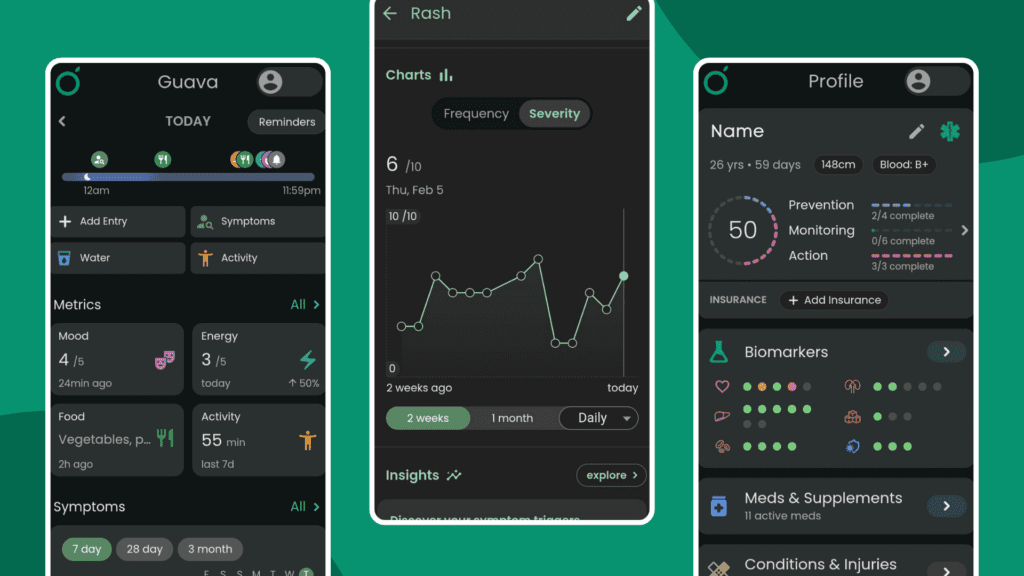
Here’s our ultimate pros and cons of the Guava app
Pros:
- Organised, well-structured and easy to use for those with cognitive issues
- Combines multiple styles of apps into one, eliminating the need for switching apps constantly
- A clean and visibly pleasing UI with dark and light modes
- Free but has a premium subscription option
- Provides excellent analytics and graphs
- Our physiotherapists can access the insights of our clients who accept an invitation to be added to the Not Just Bendy team (feature coming soon)
Cons:
- Automated insights, weather correlations, emergency cards, and accessibility features like voice logging are locked behind the premium subscription
- Despite combining the features of multiple app types, many features can feel too simplified or bare bones
- Guava’s AI assistant may not always be accurate and is limited to 3 questions a month for free users
You can download the app on both iOS and Android or access it by the website.
The Zebra Club
Created by well-known movement therapist Jeannie Di Bon, The Zebra Club is the perfect app for people wanting to engage in safe, scientifically proven gentle exercise and movement methods for those with hypermobility, POTS, ME/CFS and chronic pain. It’s a paid subscription-based service with a 7-day free trial available.

The Zebra Club is a multipurpose platform built by and for those with hypermobility. It combines a broad range of gentle and energy-friendly exercise programs, informative guides and a community hub all into one, bringing together those with hypermobility in a safe and encouraging space. The app has recently overgone a full overhaul taking on a new design and making it more accessible, organised and technologically functional for its users.
The Ehlers-Danlos Society and many healthcare professionals internationally endorse The Zebra Club and the use of Jeannie Di Bon’s successful Integrative Movement Method.
Some of The Zebra Club’s features include:
- A gentle and easy to understand introduction to the app and programs
- A large range of exercise programs of various difficulties
- Exercise programs specific to different body parts, conditions, symptoms or factors (e.g. sleep, POTS, upper body)
- Meditation audios
- A large catalogue of resources, guides on hypermobility movement education
- A friendly and well-moderated community hub with various subcategories for posts
- Monthly live Q&A sessions with Jeannie
- Special scheduled live sessions with other professionals on various hypermobility issues and topics
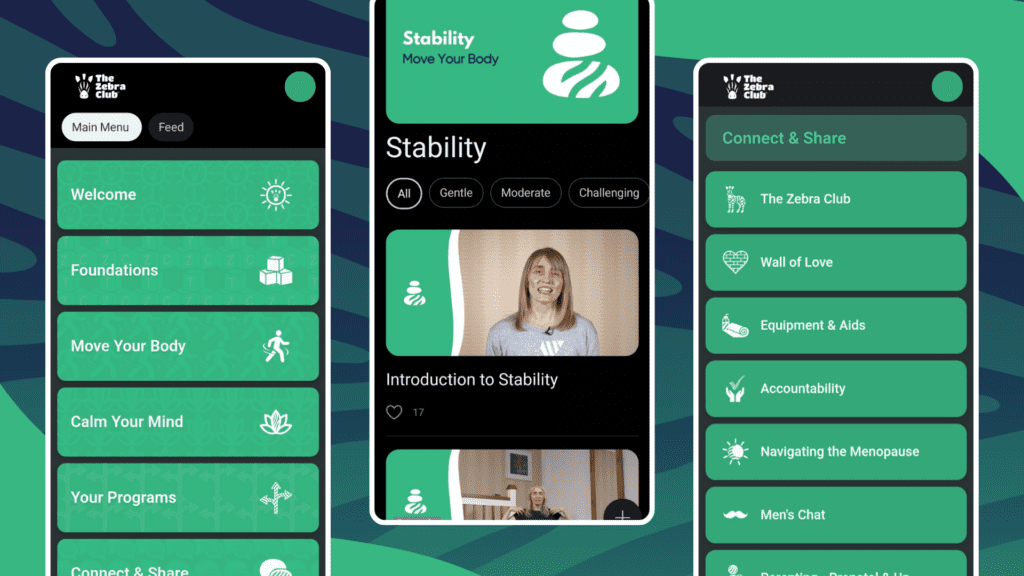
Here’s our ultimate pros and cons of The Zebra Club app
Pros:
- The ability to bookmark lessons you like or want to do more frequently
- Jeannie will often personally respond to people’s posts on the app
- Reasonable price for an exercise subscription service with options for a lifetime purchase.
- Huge library of resources and education on hypermobility, HSD and EDS
- The relaxation and foundation programs work in very well with the programs prescribed by our Not Just Bendy Physiotherapists
- This is a great alternative for those that can’t afford 1:1 or small group exercise/Pilates classes
Cons:
- The app can have some minor technical difficulties when loading pages
- Very few settings other than notification settings and the app has no light mode, only a dark mode
- You may need to purchase extra equipment to do some exercises
You can download the app on both iOS and Android or access it by the website.
Chronic Insights
Chronic Insights is another highly detailed tracking app for symptoms, pain, medication and more. With phenomenal graphs, analytics and an option to paint your pain onto a 3D model in its pro version, this app will blow you away with what it can do.

This app works seamlessly as an almost fully customisable symptom tracker. Its functions work for symptoms that occur during set periods of time, ongoing time, and as instances. This can be extremely useful for those with hypermobility wanting to track issues that occur as instances, such as subluxations, dislocations, POTS flares or reactions.
The homepage of the app greets you with a list of all your symptoms lined up together, with a graph of your choice attached to each one. This is fantastic for allowing you to get a clear visual of all your symptoms at once with very little hassle.
Some of Chronic Insight’s features include:
- Track symptoms, mood, factors, health vitals, medications and more with the ability to enter multiple symptoms into your diary at the same time
- The ability to create customised symptom rating scales, allowing users to make scales that suit them better than the standard 1-10 scale
- Easy to use customised graphs, analytics and measurement metrics
- Use a 3D body map to paint symptoms and their severity with multiple colour options, take pictures or use tags to subcategorise your symptoms
- Store health records, test results, and your data in an easily accessible way
- Compatible with smartwatches with Apple Watch or Wear OS hardware, also has a companion app that can be downloaded onto your smartwatch to quickly log symptoms
- Import records, data and information from other health and tracking apps through Health Connect
- Easily accessible health impact questionaries with the option to request new ones to be added by the developer
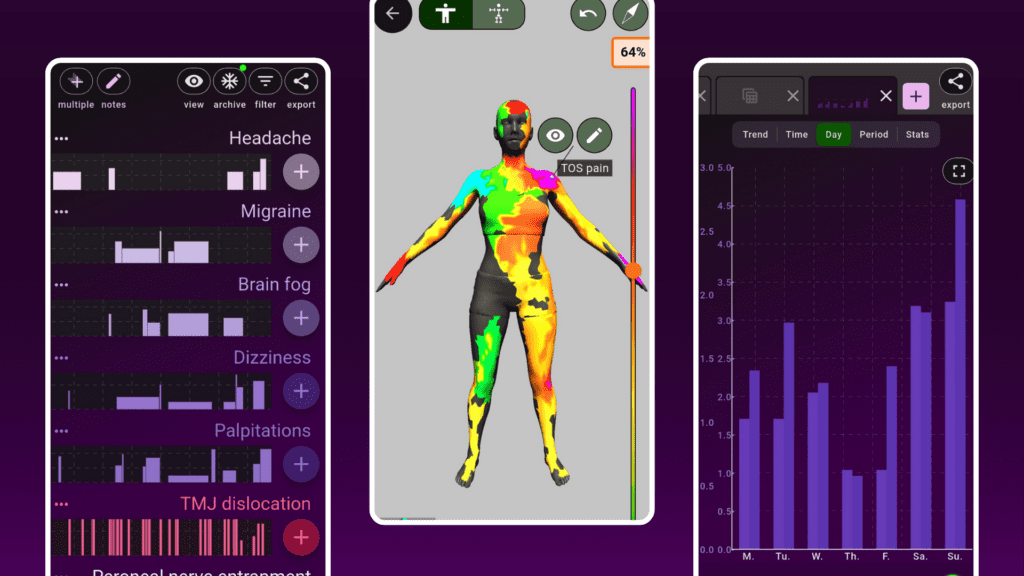
Here’s our ultimate pros and cons of the Chronic Insights app
Pros:
- Fully customisable in so many ways, letting those with hypermobility tailor the app perfectly to their needs
- Multiple accessibility options as well as dark and light modes
- Free with the option of a very low premium subscription cost
- Made by a solo developer with chronic pain and fatigue who donates 10% of all proceeds from premium subscriptions to pain charity listed in the app
Cons:
- User interface can be mildly confusing at times
- Lengthy set-up for customised aspects
- 3D body map, weather tracking, and smartwatch app are locked behind the premium subscription
You can download the app on both iOS and Android.
Manage My Pain
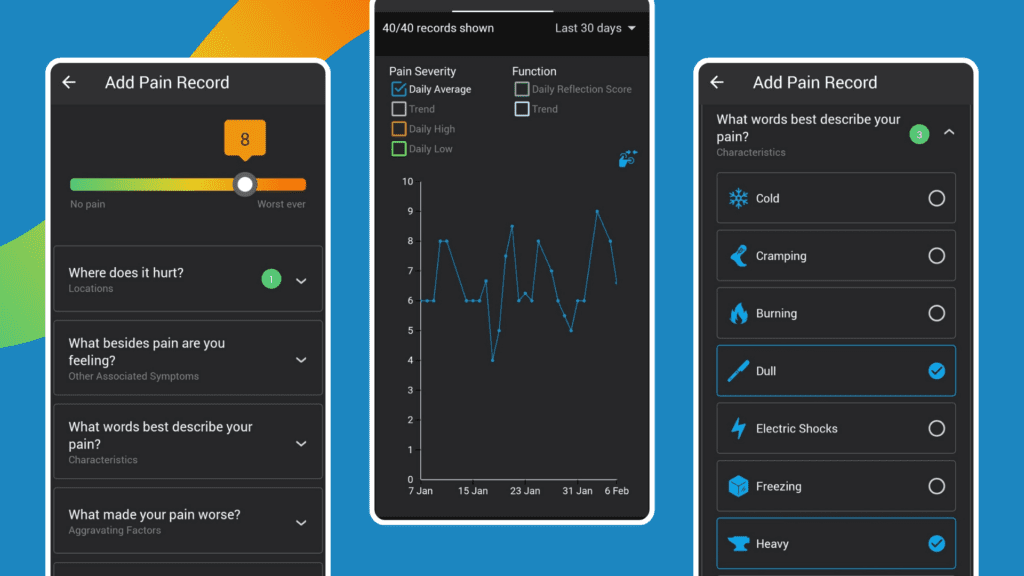
Manage My Pain is a comprehensive pain tracker app with the ability to be as detailed or as simple as you’d like. With a free version that doesn’t pester you to upgrade to pro, fantastic custom options, and easy to read graphs – it’s a great app all round.
Out of all the pain tracker apps out there, why do we like this one the best?
Not only can you track your pain levels – you can track where you were during that pain, the position your body was in and any other factors that may be involved. For many of those with hypermobility, narrowing down environmental factors involved can help with finding solutions or patterns to how your pain works and what aggravates flareups and injuries.
Manage My Pain has you rate your pain out of 10 and then puts things into 8 categories:
- Locations: Where does it hurt?
- Other Associated Symptoms: What besides pain are you feeling?
- Characteristics: What words best describe your pain?
- Aggravating Factors: What made your pain worse?
- Medications: What medication did you take for your pain?
- Interventions: What besides medication did you try for your pain?
- Timing: How long did your pain last?
- Environment: Where were you during your pain?
All these categories have pre-selectable options with the ability to add custom inputs as you like – or even take away options that aren’t necessary for you. This gives you the freedom to simplify the useability of the app, allowing you to choose between tracking one singular type of pain or multiple types.
Here’s our ultimate pros and cons of the Manage My Pain app
Pros:
- Very detailed but with the ability to be simplified for those with cognitive issues
- Shows a range of different detailed graphs
- Free but has a one payment pro version for a very cheap price
- The pro version allows you to export reports with all your graphs
- Clean and easy to understand user interface with both dark and light mode options
Cons:
- Possibly too detailed for anyone with brain fog or memory issues
- You can’t see analytics past 30 days on the free version
You can download the app on both iOS and Android.
Insight Timer
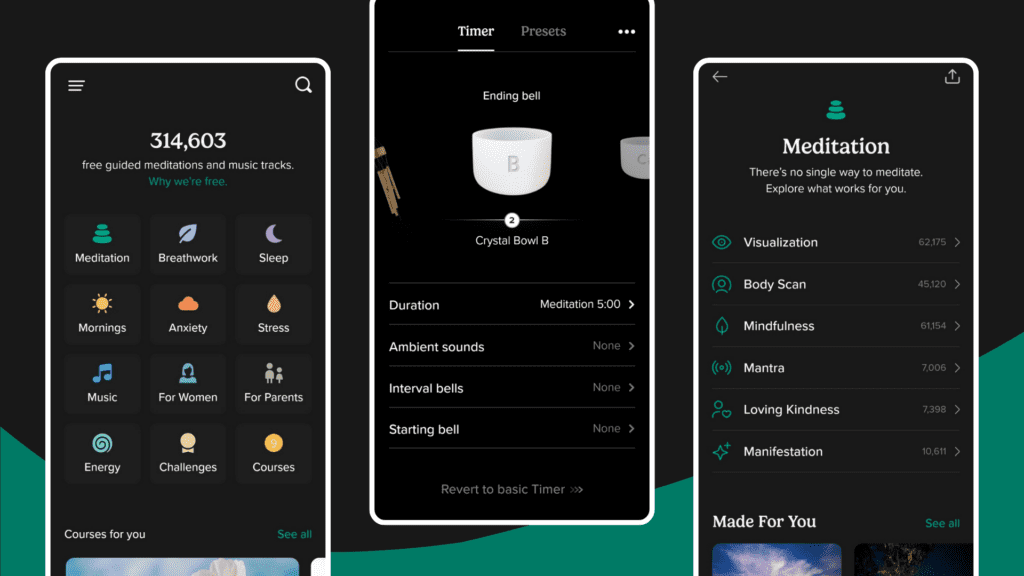
Insight timer is a meditation and relaxation app with over 300,000 free audio files to listen to. It offers both free and paid options in the app but has plenty of free content.

Stress relief can be an important but often forgotten part of managing hypermobility – and a bit of relaxation can go a long way to unwinding unwanted tension in the body. Insight Timer is a great app for this due to its large library of audios targeted at sleep, anxiety, stress, breathwork and much more.
Some of Insight Timer’s features include:
- Over 300,000 free audios with specific categories, sub-categories and tags to make finding audios easier
- Built in timer for meditation
- Mood check-in with a mood analysis graph
- Dedicated journal for your thoughts
- A personal routine list for self-care
- Bookmark favorites audios, make playlists and follow creators you enjoy
- Live events with creators for meditation, music and more
Here’s our ultimate pros and cons of the Insight Timer app
Pros:
- The majority of audios are free unlike similar apps that only have a few free audios
- Clean and easy user interface with light and dark mode options
- The extensive audio library outweighs the selection from other apps
Cons:
- Skipping forwards and backwards in the same audio is a paid feature
- Audio library size may be overwhelming and make finding quality audios to your preference more difficult
You can download the app on both iOS and Android.
Want more app recommendations from us?
These aren’t the only apps we recommend – you can find more useful apps in our large list of curated resources for hypermobility here: https://www.notjustbendy.com/links/
Learn More
You can find more information curated by Not Just Bendy at:
- What Is Hypermobility?
- Mast Cell Activation Disorders
- Postural Orthostatic Tachycardia Syndrome (POTS)
- Exercise Tips for Postural Orthostatic Tachycardia Syndrome (POTS)
- Hypermobile Hips
- Women’s Health Issues In Hypermobility
- Switching on the Lightbulb to see Hypermobility Disorders
- Hypermobility Screening & Prevention
- Exercise Classes for Hypermobility
- Hypermobility Resources
- Hypermobility Brisbane Physiotherapy